What is a virtual workspace?
A virtual workspace is a solution that allows you to organize remote work for employees without the need to install and download corporate applications on physical devices such as PCs, laptops, or smartphones. All work programs and data are stored in the cloud. Any platform can be used to connect: Windows, macOS, Android, iOS.
Thin clients do not have high requirements because their only task is to transfer data from the keyboard and mouse to the server, receive the desktop image from the server, and display it on the monitor. Most often, thin clients are small devices with a low-power processor, a small amount of RAM, and a built-in graphics and network adapter with ports for connecting peripheral devices.
Packages and capabilities
Configuration example
- 12 CPU / 108 GB RAM / 500 GB SSD
- Reserved infrastructure
- Integration with customer’s AD
- Dedicated terminal server cluster
- Windows OS on all VMs
- RDP connection
Configuration example
- 48 CPUs / 432 GB RAM / 14 TB SSD
- Reserved infrastructure
- Integration with customer’s AD
- Dedicated terminal server cluster
- Windows OS on all VMs
- RDP connection
Configuration example
- 120 CPU / 1080 GB RAM / 35 TB SSD
- Reserved infrastructure
- Integration with customer’s AD
- Dedicated terminal server cluster
- Windows OS on all VMs
- RDP connection
Suitable for
Remote work for employees from home — from 50 to 500+ people
Startups with distributed teams
Organization of a remote back office
Reducing the cost of physical workplaces when they are not constantly needed
Temporary projects — for example, in software development
Equipment
- ITGLOBAL.COM uses its own high-end equipment manufactured by NetApp and Cisco
- The cloud platform is built on equipment with redundant components that allow for “hot swapping,” eliminating a single point of failure.
- NetApp data storage system on SSD drives with flash caching is used to store virtual machine files. The capacity of the storage system allows us to provide individual clients with tens of thousands of IOPS (input/output operations per second).
Virtualization platform
VMware vSphere 6.7 is used as the virtualization platform. The platform’s capabilities include dynamic load balancing, high availability, and isolation of different customers’ virtual resources from each other at the network level.
Customers are provided with a personal self-service portal based on VMware vCloud Director when using the terminal server service and VMware Horizon 7 console when renting VDI. The customer can manage workstations independently or entrust this to the ITGLOBAL.COM team.
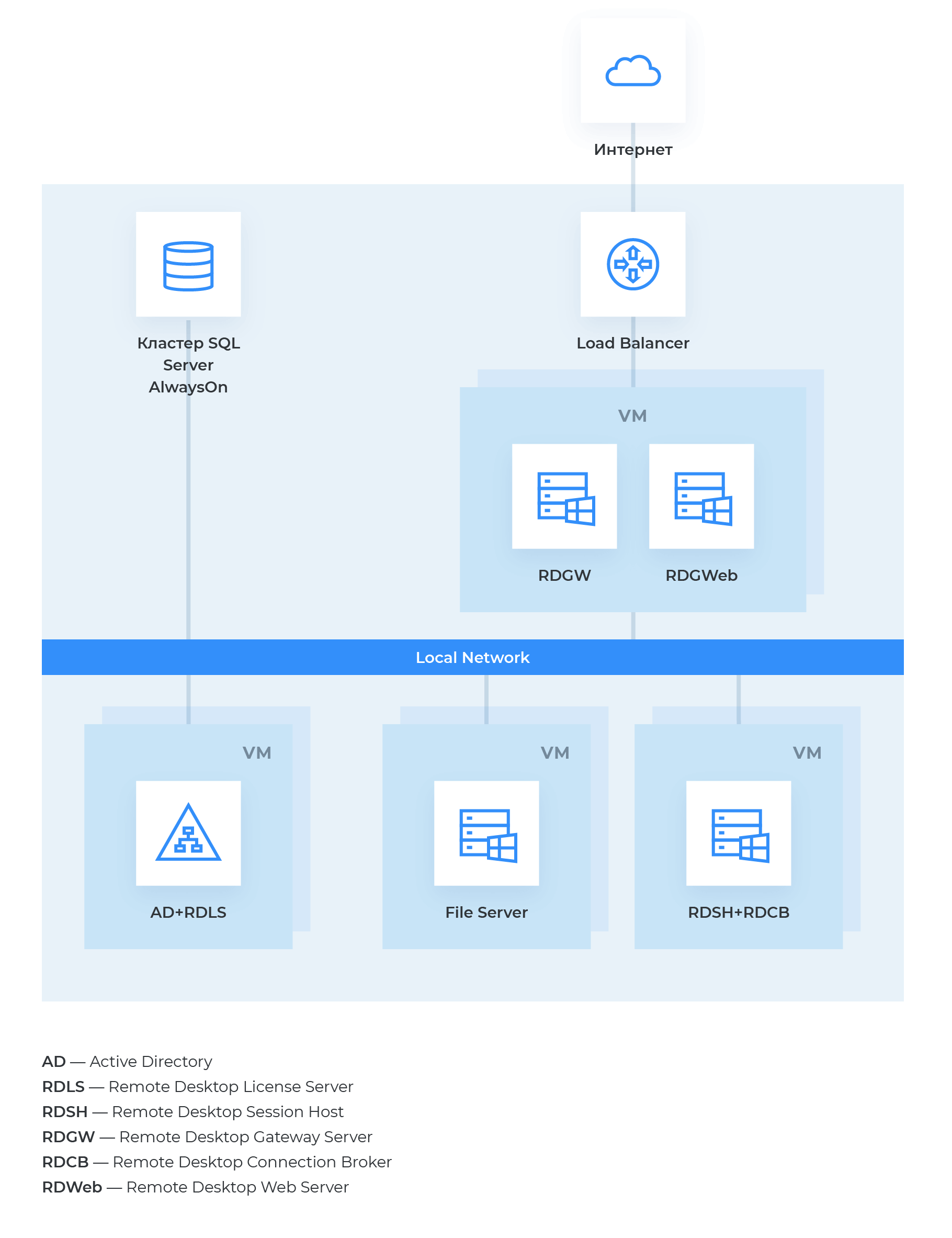
Terminal server farm — solution diagram and components
| Server | Role |
|---|---|
| Terminal server for 50 users | RD Session Host — remote desktop session node RD Connection Broker — remote desktop connection broker Additional software — MS Office, 7zip, 1C, etc. |
| MS SQL | SQL Server AlwaysOn cluster |
| Remote desktop gateway | RD Gateway + RD Web |
| Failover file server | Filover Cluster + Scale-Out File Server |
| Failover AD server | AD + licensing server (optional, if the client has their own) |
Available software
- Microsoft Office 2019 package
- Chrome, Opera, Mozilla browsers
- PDF Reader
- Antivirus
- Archiver
Advantages
Cost-effectiveness
There is no need to purchase company PCs or laptops, hire a system administrator, or worry about keeping licenses up to date.
Rapid deployment
10 minutes is all it takes to deploy and prepare a workstation for use.
Ease of use
The virtual workspace is accessible from any device and does not require any configuration by the user.
Reliability
Daily data backup, fast recovery from backup, 99.9% SLA.
Scalability
Ability to change the amount of physical resources and the number of leased licenses on demand.
1C in the cloud
Ready-made solution “1C in the cloud“: a complete package of 1C accounting programs without the need to purchase licenses.