What is VDI?
Virtual Desktop Infrastructure (VDI) is a technology that allows you to create a remote workplace using virtual machines located on the customer’s site or in the cloud. ITGLOBAL.COM provides VDI workplace virtualization as a managed service for rent under the DaaS (Desktop as a Service) model.
Remote desktop rental is:
VMware Horizon-based VDI
Own high-end equipment
10 Tier III data centers in 9 countries
Access from any device anywhere in the world
99.95% SLA
Affordable software
- Microsoft Office 2019 package
- Chrome, Opera, Mozilla browsers
- PDF Reader
- Antivirus
- Archiver
What tasks is VDI suitable for?
Controlling employee access to corporate data.
Eliminating downtime due to regular PC fleet updates.
Transformation of capital expenditures into operating expenses.
Organization of remote employees’ work.
Protecting data from failures and damage to end equipment.
Advantages of VDI

Organize the work of remote employees and geographically distributed teams.

Work from any device: PC, laptop, tablet, or smartphone.

Control employee access to corporate data.

Protect your data from hardware failure.

Virtual desktop use cases
Thanks to VDI, employees can work from home and access only the information and tools they need.
VDI infrastructure allows all team members to stay connected and access company resources from anywhere in the world.
With VDI, contractors can be given access to the company’s platform from their own devices without the risk of data leakage.
VDI technology allows you to work efficiently with graphics-intensive programs for 2D and 3D design and keep overhead costs low.
Virtual workstations are suitable for temporary projects, such as software development.
Businesses can use cloud desktops to reduce the costs of setting up physical workstations: office rent, equipment and furniture purchases.
Features of cloud desktops
Information security through isolation and location on centralized server platforms
Ability to deploy virtual workstations with high or specific technical requirements
Suitable for medium and large companies
Packages and features
Configuration example
- 12 CPU / 108 GB RAM / 500 GB SSD
- Reserved infrastructure
- Integration with customer’s AD
- Dedicated terminal server cluster
- Windows OS on all VMs
- RDP connection
Configuration example
- 48 CPUs / 432 GB RAM / 14 TB SSD
- Reserved infrastructure
- Integration with customer’s AD
- Dedicated terminal server cluster
- Windows OS on all VMs
- RDP connection
Configuration example
- 120 CPU / 1080 GB RAM / 35 TB SSD
- Reserved infrastructure
- Integration with customer’s AD
- Dedicated terminal server cluster
- Windows OS on all VMs
- RDP connection
Why choose ITGLOBAL.COM
ITGLOBAL.COM has been successfully operating in the cloud services market since 2008. The company has 12 data centers in 10 countries and works with 50+ partners and 1000+ corporate clients worldwide. We are the only VMware solution provider in Russia with more than 15 years of expertise.
ITGLOBAL.COM is Russia’s first VMware Service Provider Partner. The VMware VSPP program in Russia was developed specifically for ITGLOBAL.COM and laid the foundation for building a new service in IT and business as a whole.
Equipment
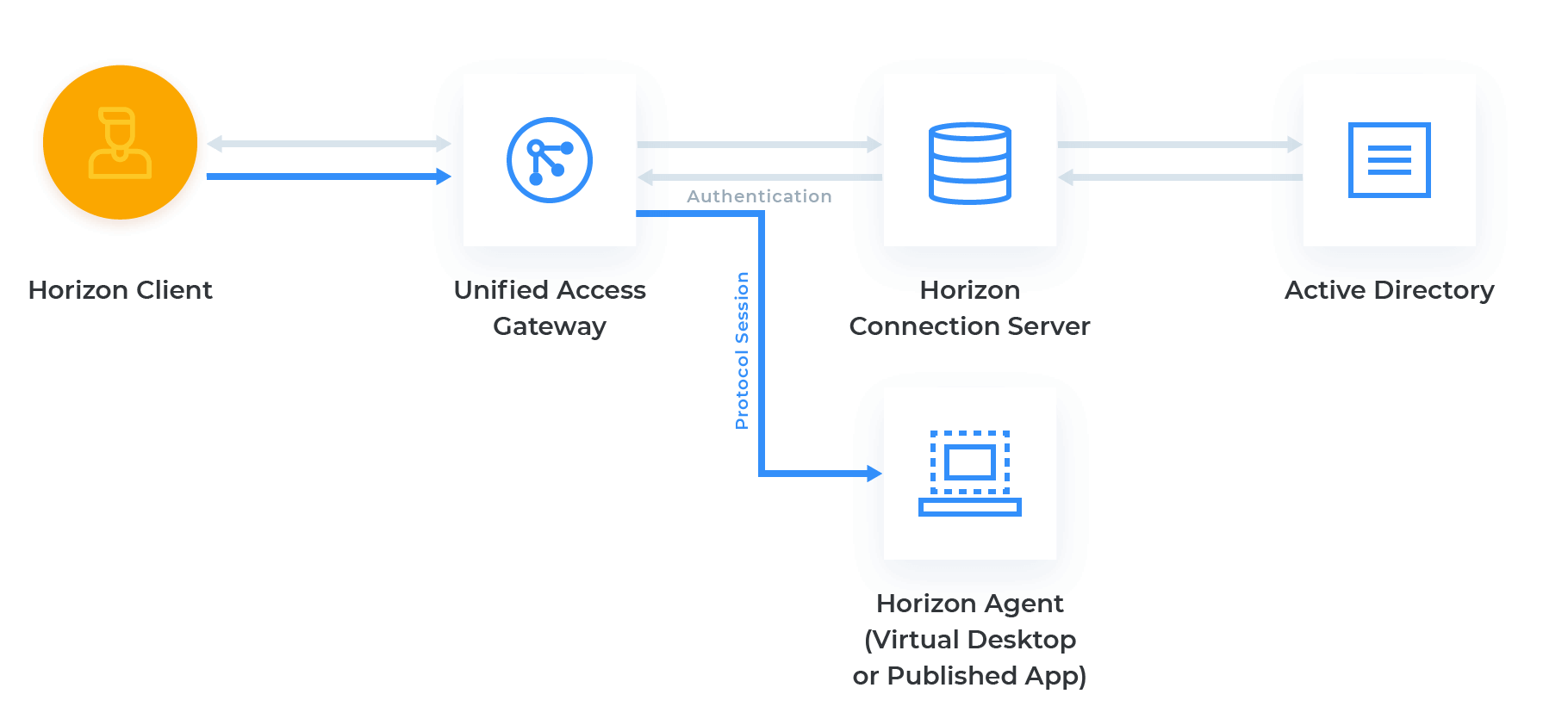
Basic solution diagram and components
VMware Horizon software is used to deliver virtualized desktops. It is a modern platform for providing and using VDI. With its help, administrators can automate and make the management of virtual workstations and applications more secure.
FAQ
For desktop virtualization, we use the new edition of the vSphere platform, VMware Horizon, which includes all the features of vSphere Enterprise Plus. The platform provides scalability, high availability, and optimal performance for all virtual desktop workloads.
A virtual workplace is a solution that allows you to organize remote work for employees without the need to install and download corporate applications on physical devices such as PCs, laptops, or smartphones. All business programs and data are stored in the cloud. Any platform can be used to connect: Windows, macOS, Android, iOS.
We use VMware Horizon 8 to implement the DaaS model for renting remote VDI workstations. Each remote desktop is represented by a separate virtual machine, whose resources, unlike a terminal server, are not shared with other users, ensuring stable performance.
VMware Horizon 8 is integrated with VMware’s software-defined data center, which includes vSphere and NSX. Businesses get a ready-made solution for on-premises and public cloud environments that eliminates the need for disparate storage, virtualization, and networking products.
Yes.
You can connect to VDI from a macOS device, but VDI itself will run on Windows or Linux.
Yes, but you will probably need a 3D VDI service with a graphics accelerator (vGPU).
We can provide Microsoft licenses and Kaspersky antivirus software for rent.
USB keys can be transferred to VMs, including VDI. However, we always recommend replacing them with software keys.macOS
No.