
SnapShot
What is a snapshot?
A snapshot is a kind of “photo” of the state of a system (for example, a virtual machine or file system) at a specific point in time. If a failure occurs, you can quickly “roll back” and restore the system to this state.
The essence of the technology
When a snapshot is created, the current state of the metadata is recorded: where the data blocks are located and which versions are considered current. After that, new changes continue to be recorded in the usual way, but the copy-on-write or redirect-on-write mechanism saves references to the changed blocks and keeps track of their new versions. Thanks to this, when restoring, the system simply returns the pointers to the state recorded at the moment the snapshot was created.
A snapshot is an exact copy of data at a specific point in time, which is created almost instantly without stopping running applications. Unlike traditional backup, a snapshot does not require a lengthy process of copying all data. Instead, it uses special algorithms, such as copy-on-write or redirect-on-write, which track only changes in data after the snapshot is created.
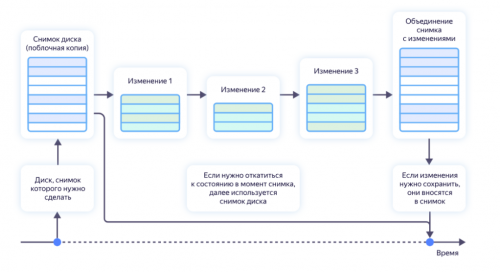 Snapshot technology is especially important for modern IT infrastructures, where business continuity with minimal downtime is required. A snapshot allows you to create a recovery point in literally seconds, while a full backup can take hours.
When a snapshot is created, metadata is saved: links to data blocks, as well as file system service information—access rights, timestamps, and other parameters. This allows the snapshot to accurately record the state of the system and restore it if necessary.
If you need to return a virtual machine or file to its original state, you only need to delete the files with changes and continue using the disk from the moment the snapshot was taken.
When to take snapshots
- Before updates — if something goes wrong, it’s easy to revert to a working version.
- For tests and experiments — you can play with the system without fear of breaking anything.
- For on-the-fly backup — it’s convenient to create copies without stopping the system.
- For quick recovery — return to working condition after errors.
- When migrating data — create a checkpoint before transferring systems.
- For development and testing — the ability to quickly roll back changes in code or configuration.
- Before installing new software — insurance against unstable operation of new applications.
- When working with critical data — create intermediate save points.
Snapshot and backup — what’s the difference?
A snapshot captures the state of the system at a specific point in time. It is a quick and convenient tool that allows you to create a restore point in literally seconds. It only stores changes made after the snapshot was taken and therefore takes up almost no space, and rolling back to the saved state is almost instantaneous.
A backup is structured differently. It is a complete copy of all data that can be stored both on external media and in the cloud. It takes longer to create and requires additional steps to restore. However, it is the backup that provides reliable protection against hardware failures and catastrophic losses, because the data exists independently of the original system.
Thus, snapshots are convenient for quick rollbacks and testing, while backups are convenient for long-term storage and protection. These technologies do not replace each other, but complement each other: snapshots solve the tasks of rapid recovery, while backups guarantee the preservation of information over the long term.
Disadvantages of snapshots
Despite their convenience, snapshots have their limitations. Storing a large number of snapshots can slow down the system: each new point increases the load on read and write operations. In addition, although a snapshot is created almost instantly and takes up little space, when actively working with data, its volume begins to grow rapidly, as all changes must be stored.
It is important to note that a snapshot is not a complete copy. It depends on the integrity of the original volume or file system. If the original data is damaged or the physical media fails, all snapshots will be lost along with it. Therefore, a snapshot cannot be considered complete protection against hardware failures.
Managing a large number of snapshots also requires discipline. If you do not delete outdated restore points, they will gradually “clutter” the system and take up more and more space. In some cases, there is also a performance issue: multiple snapshots lead to data fragmentation, which reduces the efficiency of the storage system.
Finally, not all applications work correctly with snapshots. This is especially true for databases and systems where transactions are actively performed: data inconsistency can make recovery problematic. As a result, snapshots are useful as a quick backup and rollback tool, but they require careful planning and should always be used in conjunction with traditional backup.
Options for creating snapshots
Snapshots can be created in different ways depending on the platform and implementation level.
CREATE SNAPSHOT
One of the basic approaches is to use the CREATE SNAPSHOT command, which applies Copy-on-write or Redirect-on-write algorithms. These methods allow you to capture the current state of the data without having to copy it completely, making the process fast and efficient.
SNAPSHOT PROVIDER
At the hardware level, snapshots are generated by storage systems such as NetApp or EMC. In this case, the state is captured directly in the storage controllers, which ensures high performance and scalability and reduces the load on the operating system. Software solutions are implemented at the operating system level. Such providers intercept write operations between the file system and the volume, allowing snapshots to be created without interfering with the operation of applications.
SNAPSHOT WINDOWS
Windows uses the built-in Volume Shadow Copy Service (VSS), which allows you to create consistent snapshots on both physical servers and virtual environments. VSS coordinates the work of applications, the operating system, and hardware to create consistent snapshots even while the system is actively running.
SNAPSHOT LINUX (LVM)
Similar functionality in Linux is implemented through the Logical Volume Manager (LVM), which supports a variety of file systems, including EXT, XFS, and Btrfs. LVM allows you to create and manage snapshots of logical volumes via the command line using the lvcreate, lvremove, and other utilities.
VMWARE SNAPSHOT
For virtual machines, such as those in VMware, snapshots are created using the platform’s built-in tools. These snapshots capture not only the contents of the disk, but also the state of the RAM and the configuration of virtual devices, allowing the machine to be fully restored to the state it was in when the snapshot was taken. VMware snapshots support linked clones and allow you to create chains of snapshots for more flexible management of virtual machine versions.
How it looks
Imagine a timeline with markers—each snapshot is a point you can return to. All changes after the point are separate. This helps you understand where you were and where you can return to.
In short: SnapShot is a way to quickly save and, if necessary, restore the system to the desired state. It’s a great tool for testing and quick recovery, but it’s still not a substitute for a real backup.
File system and virtual machine snapshots
A virtual machine is a file containing data that includes the contents of a virtual hard disk, RAM, processor registers, and a description of the virtual machine configuration in a language that the hypervisor understands.
Therefore, you can do the same things with a virtual machine as you can with file systems, including creating copies (snapshots) of them. Once such a copy is created, it is written to the hard disk.
All subsequent changes to the virtual machine or file system will be written to another file, and all further work will be reduced to changing that file.
If, after some time, you create another snapshot, a new file will be created in which all changes will remain recorded. And there is always the option to return to a specific snapshot.
Features
The snapshot creation technology has the following features:
- snapshots are stored near the virtual disks on which they are created;
- the number of snapshots is constantly growing, and their size can exceed the size of the file system or virtual machine itself;
- snapshot files are reserved dynamically, which negatively affects machine performance;
- The “lifespan” of each snapshot should not exceed 72 hours, otherwise the virtual machine will slow down significantly.
And even though many people call SnapShot a type of backup, file system snapshots cannot be considered a full backup, as they only contain the history of file changes.
 Previous article